
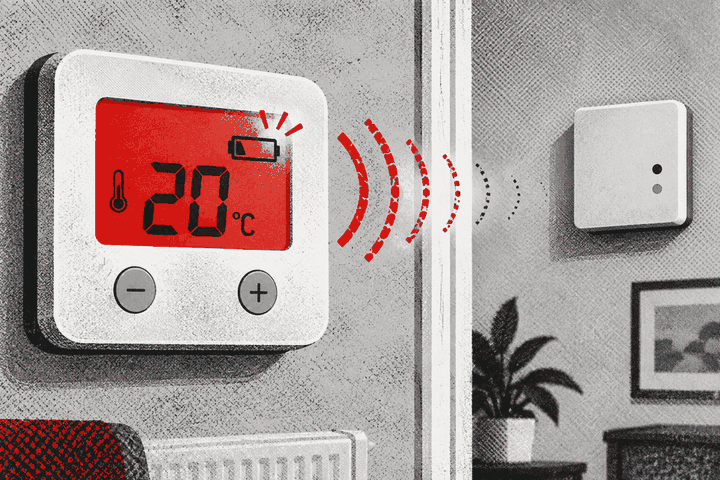
Can a thermostat display stay on with batteries too weak to transmit?
Yes. A display can use very little power, while the radio transmitter needs a stronger burst of current. Some wireless thermostats therefore continue showing the temperature after their batteries have weakened enough to make communication unreliable. The exact warning and fail-safe behaviour depend on the model.
Look for the product’s low-battery and communication symbols, then replace user-replaceable batteries with the exact type specified, as a complete matched set. Confirm polarity and allow the device time to reconnect. If communication remains poor, use the manufacturer’s signal test and check receiver power without opening either the receiver or boiler.
Why the screen can outlast the radio link
An LCD normally needs little energy to retain a reading. Sending and receiving a radio message creates a different electrical demand. Ageing batteries may still maintain the screen voltage but dip when the thermostat tries to transmit. The result can be a normal-looking temperature display beside a receiver that no longer follows commands reliably.
Resideo’s Sundial RF guidance says reduced battery power may affect RF signal strength and impair communication. Its user material also explains that a flashing battery symbol may appear while the display remains active. This is a product-supported explanation, not a reason to assume every dropout is caused by batteries.
What the display does and does not prove
A visible room temperature proves only that the display and enough of the thermostat electronics are powered. It does not prove that the thermostat has sent its latest command, that the receiver acknowledged it, or that the boiler has a demand. Some displays also show a stored value between measurements.
Look for a connection icon, warning symbol or receiver indicator defined in the manual. Do not interpret an unfamiliar icon from another brand’s guide. Resideo distinguishes a low-battery warning, RF communication error, heating demand and successful boiler-relay connection on supported products.
Typical signs of weak batteries
- A battery icon flashes or appears intermittently.
- The receiver reports a low-sensor-battery message.
- The thermostat responds locally but the receiver misses changes.
- The link returns after batteries are disturbed or temporarily warmed.
- The display fades, resets or loses contrast during a command.
- Communication becomes reliable after a correct fresh set is installed.
These signs overlap with a poor radio path, dirty battery contacts, a loose holder or failing thermostat. A battery replacement is a sensible first step only when the manufacturer permits it.
Use the exact battery specification
Read the battery compartment marking and current product guide. Many room thermostats use alkaline AA cells, but some use AAA, lithium, rechargeable or sealed packs. Wiser specifies fresh alkaline cells for certain radiator thermostats and warns against unsupported rechargeable batteries. Other Resideo equipment allows particular chemistries only when a configuration parameter is changed.
Never choose cells merely because they fit. Different voltage curves can make the battery indicator inaccurate or affect radio performance. If the manual is unavailable, identify the exact model before buying replacements.
Replace the whole set together
Fit fresh, matching batteries from the same pack and date range. Do not mix old and new cells, brands or chemistries. Observe the polarity marks and keep contacts clean and dry. Do not scrape contacts with metal tools or apply household sprays.
If a battery has leaked, avoid direct contact, ventilate the area and follow the battery manufacturer’s safety and disposal advice. A corroded thermostat or damaged holder may need replacement rather than further experimentation.
Preserve settings before removal
Photograph the display, schedule and warnings before taking batteries out. Some products retain their programme but need the time corrected afterwards; others restore automatically from a hub. The manual tells you what to expect. Do not perform a factory reset as part of routine battery replacement.
Note the date. A simple replacement record helps reveal unusually short battery life, which can point to poor signal conditions, incompatible cells or a device fault.
Allow time for reconnection
After replacement, refit the thermostat correctly and wait for the period stated in its guide. Some systems reconnect automatically after a few minutes; others require an approved wake-up, link test or recommissioning step. Watch the receiver and thermostat indicators rather than repeatedly changing the temperature.
A short successful connection beside the receiver does not validate the normal location. Return a portable thermostat to its representative position and use the product’s signal test there.
Check receiver power safely
A healthy thermostat cannot communicate with an unpowered receiver. Observe the receiver lights and accessible supply switch described for the user. Check whether another household member, timer or recent electrical work changed the supply.
Do not remove the receiver cover. It commonly contains mains-voltage wiring and boiler-control terminals. If indicators are dead, the unit is loose, hot, damaged or buzzing, arrange a competent electrical or heating inspection.
Weak signal can mimic weak batteries
Walls, floors, foil-backed plasterboard, metal appliances and excessive distance can reduce the link. Fresh batteries may temporarily improve a marginal route without solving the underlying placement issue. Resideo and Drayton recommend signal testing and attention to metal objects and building construction.
Use the manufacturer’s signal-strength or communication test with devices in their normal positions. Record the result and avoid copying numeric thresholds between brands.
Do not re-pair too soon
Re-pairing can erase useful evidence or schedules and may succeed only because the thermostat has been carried beside the receiver. Replace batteries and follow the normal reconnection sequence first. Recommission only when the correct manual directs it.
If pairing is necessary, complete the final signal test after returning every component to its everyday position. Never open boiler menus or wiring compartments to force a connection.
Smart app status can be a separate issue
Some systems use one radio link between thermostat and hub and another connection from the hub to Wi-Fi or the internet. An offline app does not always mean that local heating control has stopped. Likewise, a lit app screen may show a last-known temperature while the room device is unreachable.
Check the physical device and hub status as well as the app. Follow the manufacturer’s service and network guidance rather than resetting every component together.
What happens when batteries become critically low?
Fail-safe behaviour varies. A thermostat may stop transmitting, display a fault, ask the receiver to follow a fallback state or allow a radiator valve to open. Resideo documents one radiator controller that opens its valve fully when batteries are too weak. That behaviour must not be assumed for another product.
Respond to the first low-battery warning instead of waiting to discover the final state during cold weather.
For landlords and tenants
Tenants should report low-battery and communication warnings promptly and follow agreed responsibilities for consumable batteries. Photograph the exact symbols and record whether heating was affected. Do not open a fixed receiver or alter wiring.
Landlords should keep model details and battery instructions available, record replacements and investigate repeated short battery life. Reliable heating control should not depend on occupants repeatedly removing and refitting a device without guidance.
When to arrange professional help
Seek help when fresh correct batteries do not restore the link, the holder is damaged, contacts are corroded, receiver power is uncertain, or the thermostat repeatedly loses pairing. A heating engineer can test the radio path and controls. An electrician should address fixed-supply faults. Gas-boiler casings must be opened only by a Gas Safe registered engineer.
Plan battery checks before cold weather
Do not wait for the first freezing evening to discover that a warning has been ignored. Check the thermostat display and app notifications at the start of the heating season, keep the specified spare cells in a dry place and make sure occupants know what the genuine low-battery symbol looks like. Spares should remain in their packaging, away from children, heat and metal objects that could bridge the terminals.
Recycle used household batteries through an appropriate collection point; do not put loose cells into general rubbish or store damaged batteries with fresh ones. A seasonal check is not a substitute for servicing the heating system, but it reduces avoidable loss of wireless control.
Common questions
Can I test old batteries with a household meter?
An unloaded voltage reading may not reveal their behaviour during radio transmission. The manufacturer’s warning and replacement procedure are more useful.
Are rechargeable batteries suitable?
Only when the product explicitly supports their voltage and chemistry. Do not assume that rechargeable AA cells are equivalent to alkaline AA cells.
Why did moving the batteries restore the link?
It may have briefly improved contact or restarted the device. That does not prove the batteries are healthy.
Can I use the receiver override?
Only as the product guide permits and only as a temporary user control. It does not repair communication.
The practical conclusion
A lit thermostat display is not a radio test. Weak batteries can support the screen while failing during transmission. Use the exact warning guidance, fit the correct matched battery set, allow proper reconnection and test the link in its normal position. If the problem remains, investigate signal path and receiver power professionally.
Thermostat still not reaching the receiver?
Have its batteries, radio path and heating controls assessed together.